
Check Out Password From the Login Page By Using JavaScript

See The Password By Using JavaScript Within 10 Seconds.
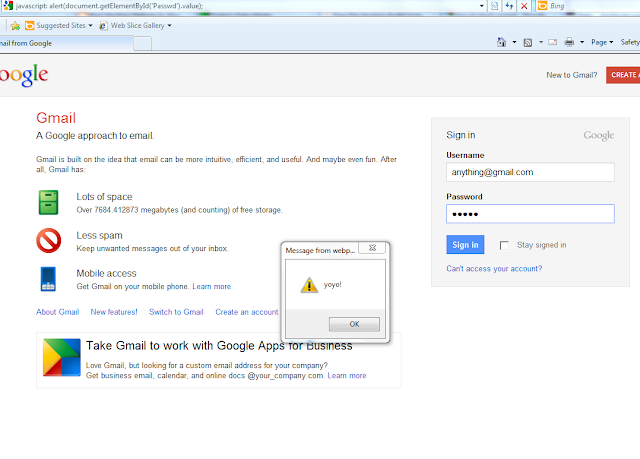
 
Hey friends this an old thing but still I'm posting it. It's good for the begginers .
  You can't see the password on the login page whenever you're entering the password. You can only see like this asterisk symbols  '' *********** ''  form and want to decrypt it into it's original word form,  by doing just only copying and pasting this script in your url box.  
The Code Is Below
javascript: alert(document.getElementById('Passwd').value);
After entering the code in the URL Bar then press enter. As you can see in the image above, the password I typed was ''YoYo'' and then I pasted the script in url box(address bar) and pressed enter, so the password showed up!
It's only work in the INTERNET EXPLORER ONLY for this script !

Comments

Post a Comment

Popular posts from this blog

How to hack anyone System in seconds and Create viruses

G et some knowledge about virus... What is Virus ?  A computer virus is a program or piece of code that is loaded onto your computer without your knowledge and runs against your wishes. All computer viruses are man-made. A simple virus that can make a copy of itself over and over again is relatively easy to produce. Even such a simple virus is dangerous because it will quickly use all available memory and bring the system to a halt. An even more dangerous type of virus is one capable of transmitting itself across networks and bypassing security systems   Create Virus on Notepad : It is very easy to create a virus on notepad   H ow to open notepad follow these steps 1. P ush win + R then new window will open then type notepad and click on OK . After that notepad will open then type or paste these command and make a virus.   1 -> Virus Creation Tricks 1 Just open the Notepad and type the paste the following Code. set ws=createobje...

How to Block Unwanted Websites Using HOSTS FILE and hack HOST file

Block or Redirect Unwanted Websites Using HOSTS File The hosts file is one of the interesting and useful feature of both Windows and Linux operating systems that provides many handy options in addressing network nodes. For instance, you can use the hosts file to block annoying ads, pop-ups, banners, porn sites, or even redirect one website to another . In this post I will show you how to play around with the hosts file to accomplish some of the above mentioned jobs.  Let's take some knowledge about host file. What is a hosts File? The hosts file is just like any other computer file that is used by the operating system to map hostnames and domain names on to their corresponding IP addresses . In other words, when you type “google.com” on your browser’s address bar, your computer will look for the hosts file to see if it contains the corresponding IP address for the domain name you typed (google.com). In case if no entry is present i...

Check Your Mother Board Model Number ,Serial Number, Version, And Many More.

How to Check Your Motherboard Model Number on Your Windows PC Whether you need to update drivers, want to check hardware compatibility, or you’re just curious , it’s way easier to check your motherboard model number with these simple tricks than it is to crack open your computer case to check the board itself . Read on as we show you how to check your motherboard model number from the comfort of your keyboard. Why Do I Want To Do This? There are a variety of situations where knowing your motherboard’s model number is important: upgrading your drivers, buying new hardware (you’ll need the proper expansion slots for card-based upgrades and the right memory DIMMS for memory upgrades, etc.), and checking the capabilities of your board if you’re considering upgrading the entire thing.  First Way (SIMPLEST WAY):- In this way there is only two step :- Step 1:- Go to Run(By Pressing Win+R) . Step 2:- Type dxdiag in Run and hit enter . ...